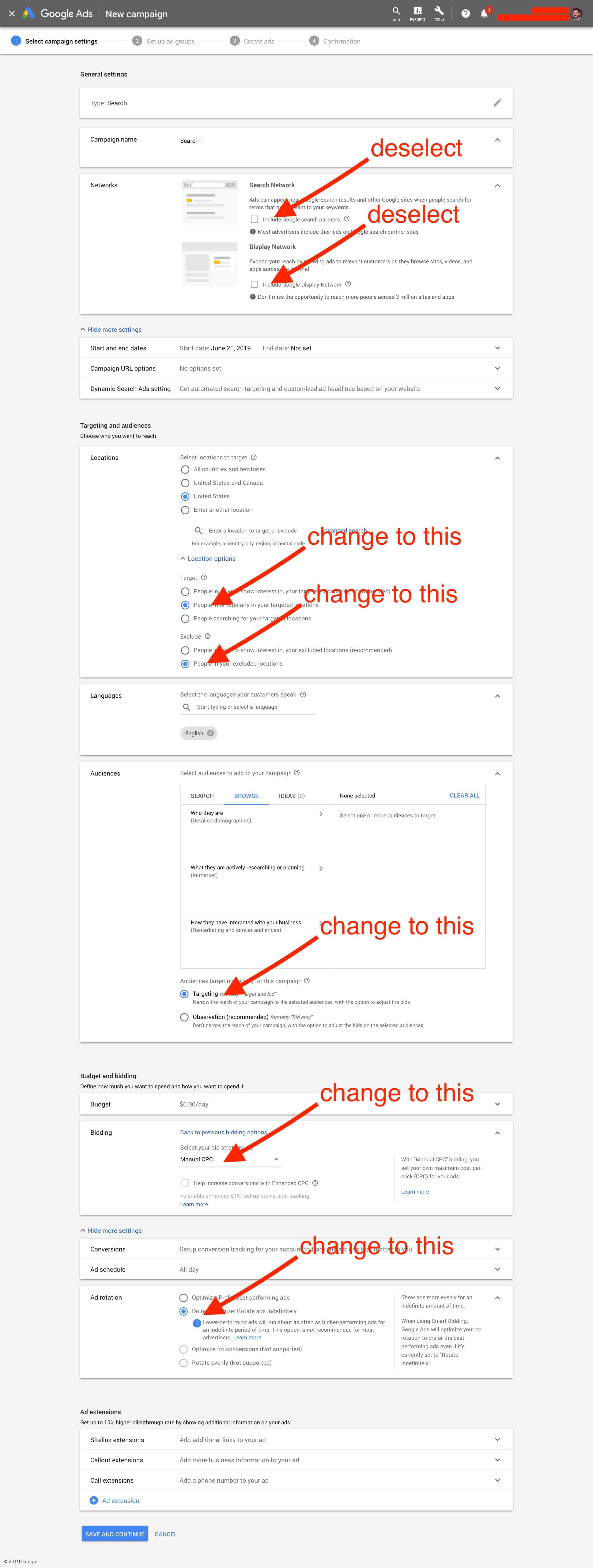
For Google you have targeting options in your campaign setup and then on the keyword level – let’s review:
- Whether you target networks (network options explained here)
- Only Google Search – Do this!
- Add “Search Network” – Deselect this!
- Add “Display Network” – Deselect this!
- Location targeting (and specifically targeting method)
- Target people in, show interest in, your targeted location – Deselect this!
- People in our regularly in your targeted locations – Do this!
- People searching for your targeted locations – Ignore this!
- Audiences – Ignore this but good for running AB tests later!
- Who they are (demographics)
- What they are actively researching (in-market)
- How they have interacted with your business (remarketing / similar audiences)
- Keyword match type (match types explained here)
- Broad match – Don’t do this!
- Phrase match – Start here if you plan to “refine” keyword targeting down over time
- Exact match – Start here if you plan to “expand” keyword targeting over time or want to “set it and forget it”
- Bidding
- Manual bid strategies
- Manual CPC – Start here!
- Automated bid strategies – Ignore these but good for running AB tests later!
- Target CPA (cost-per-action), Target ROAS (return on assets), Maximize clicks, Maximize conversions, Target search page location, Target outranking share, Enhanced CPC, Target impression share
- Device bid adjustments – Ignore this! (comes later)
- Manual bid strategies